
Intune App List + Assignments
A customer recently reached out asking if we had a report that could grab every application created in Intune and display all the assignments associated with each one. At Patch My PC, we didn’t have a specific report for that exact scenario (at the time of this writing), so I decided to build a custom solution.
I figured it wouldn’t be too difficult to pull this data using PowerShell and the Microsoft Graph API. Below is the journey from a basic raw data dump to a polished Excel report.
Prerequisites
Before running these scripts, you will need the Microsoft Graph module installed. If you don’t have it yet, you can run:
Install-Module Microsoft.Graph -Scope CurrentUser
v1
This was my initial attempt. The goal here was simply to get the data out. The script connects to Graph, retrieves all mobile apps, iterates through their assignments, and resolves the Group IDs to friendly Display Names.
Here is the code:
Connect-MgGraph -Scopes "DeviceManagementApps.Read.All","Group.Read.All"
$apps = Get-MgDeviceAppManagementMobileApp -All
$results = @()

foreach ($app in $apps) {
    $assignments = Get-MgDeviceAppManagementMobileAppAssignment -MobileAppId $app.Id
    foreach ($assignment in $assignments) {

        $groupId = $null
        if ($assignment.Target.GroupId) {
            $groupId = $assignment.Target.GroupId
        } elseif ($assignment.Target.AdditionalProperties.groupId) {
            $groupId = $assignment.Target.AdditionalProperties.groupId
        }

        $groupName = if ($groupId) {
            try {
                (Get-MgGroup -GroupId $groupId -ErrorAction Stop).DisplayName
            } catch {
                "Group Not Found ($groupId)"
            }
        } else {
            "All Users / All Devices"
        }

        $results += [PSCustomObject]@{
            AppName        = $app.DisplayName
            AssignmentType = $assignment.Intent
            GroupName      = $groupName
            GroupId        = $groupId
            IncludeExclude = $assignment.Target.'@odata.type'
        }
    }
}

$results | Export-Csv ".\Intune-App-Assignments.csv" -NoTypeInformation
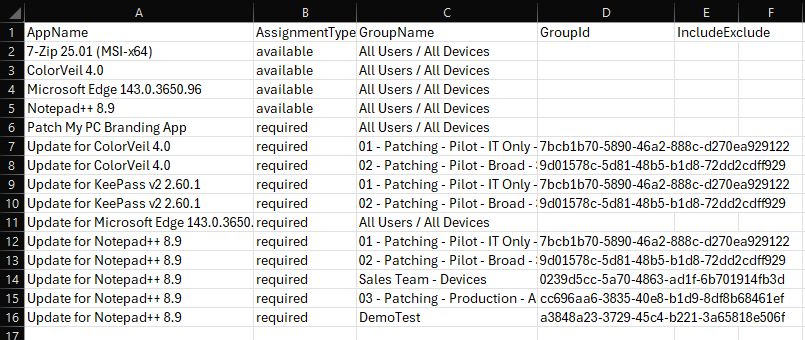
The output gives you the raw data, but it looks a bit flat:
v2
The CSV method worked, but it wasn’t exactly pretty, especially if you have apps with multiple assignments cluttering up the rows. I wanted something cleaner that consolidated the data.
This version requires the ImportExcel module to handle the formatting:
Install-Module ImportExcel -Scope CurrentUser
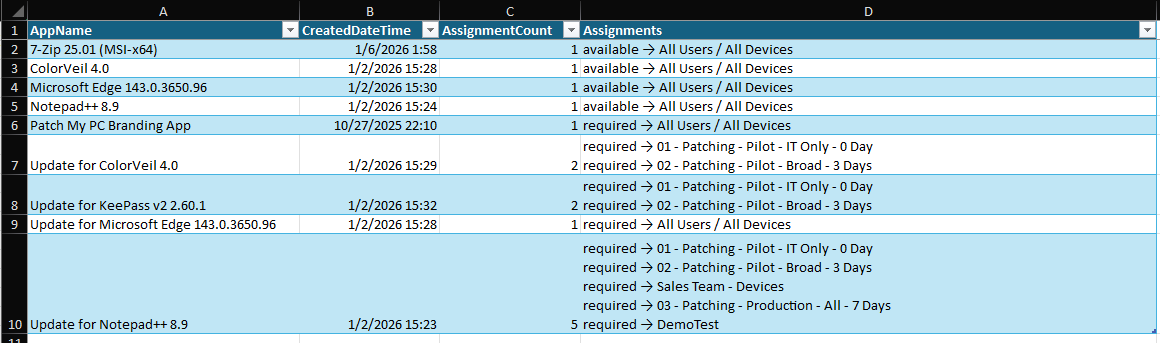
This script aggregates the assignments per app and formats the Excel sheet with text wrapping and auto-adjusted row heights for better readability:
Connect-MgGraph -Scopes "DeviceManagementApps.Read.All","Group.Read.All"
$apps = Get-MgDeviceAppManagementMobileApp -All
$appAssignments = @{}

foreach ($app in $apps) {
    $assignments = Get-MgDeviceAppManagementMobileAppAssignment -MobileAppId $app.Id

    $assignmentList = @()
    foreach ($assignment in $assignments) {
        $groupId = $null
        if ($assignment.Target.GroupId) {
            $groupId = $assignment.Target.GroupId
        } elseif ($assignment.Target.AdditionalProperties.groupId) {
            $groupId = $assignment.Target.AdditionalProperties.groupId
        }
        # Fun fact, the All Devices Group doesn't have a groupID associated with it
        $groupName = if ($groupId) {
            try {
                (Get-MgGroup -GroupId $groupId -ErrorAction Stop).DisplayName
            } catch {
                "Group Not Found ($groupId)"
            }
        } else {
            "All Users / All Devices"
        }

        $assignmentList += [PSCustomObject]@{
            Intent = $assignment.Intent
            GroupName = $groupName
            IncludeExclude = $assignment.Target.'@odata.type'
        }
    }

    # Store in hashtable by app name
    if (-not $appAssignments.ContainsKey($app.DisplayName)) {
        $appAssignments[$app.DisplayName] = [PSCustomObject]@{
            AppName = $app.DisplayName
            CreatedDateTime = $app.CreatedDateTime
            Assignments = $assignmentList
        }
    } else {
        # Merge assignments if app name already exists
        $appAssignments[$app.DisplayName].Assignments += $assignmentList
    }
}

# Build final output
$excelData = @()
foreach ($appName in $appAssignments.Keys | Sort-Object) {
    $app = $appAssignments[$appName]

    if ($app.Assignments.Count -eq 0) {
        $excelData += [PSCustomObject]@{
            AppName         = $app.AppName
            CreatedDateTime = $app.CreatedDateTime
            AssignmentCount = 0
            Assignments     = "No Assignments"
        }
    } else {
        # Combine intent and group as paired lines
        $assignmentStrings = $app.Assignments | ForEach-Object {
            "$($_.Intent) -> $($_.GroupName)"
        }
        $allAssignments = $assignmentStrings -join "`n"

        $excelData += [PSCustomObject]@{
            AppName         = $app.AppName
            CreatedDateTime = $app.CreatedDateTime
            AssignmentCount = $app.Assignments.Count
            Assignments     = $allAssignments
        }
    }
}


$filePath = ".\Intune-App-Assignments.xlsx"

$excelData | Export-Excel -Path $filePath `
    -AutoSize `
    -FreezeTopRow `
    -BoldTopRow `
    -TableName "IntuneApps" `
    -TableStyle "Medium2" `
    -WorksheetName "App Assignments" `
    -AutoFilter


$excel = Open-ExcelPackage -Path $filePath
$worksheet = $excel.Workbook.Worksheets["App Assignments"]


$assignmentsColumn = $worksheet.Dimension.End.Column
for ($row = 2; $row -le $worksheet.Dimension.End.Row; $row++) {
    $cell = $worksheet.Cells[$row, $assignmentsColumn]
    $cell.Style.WrapText = $true


    $lineCount = ([regex]::Matches($cell.Text, "`n")).Count + 1
    $minHeight = $lineCount * 15
    if ($worksheet.Row($row).Height -lt $minHeight) {
        $worksheet.Row($row).Height = $minHeight
    }
}


$worksheet.Column($assignmentsColumn).Width = 80

Close-ExcelPackage $excel -Show

Write-Host "Excel file created: $filePath" -ForegroundColor Green
Now, the final result looks much more professional:
I also published it here: https://github.com/ckdalton01/Get-AllAppsAllAssignments